Example scripts from Chapter 6
Open Source GIS: A GRASS GIS Approach
Markus Neteler, Helena Mitasova
3. Edition 2007, 426 pages
Springer, New York
ISBN-10: 038735767X | ISBN-13: 978-0-387-35767-6 | e-ISBN-13: 978-0-387-68574-8
SQL support in GRASS 6
g.region vect=schools_wake -p
d.erase
# show all schools in Wake County
d.vect schools_wake col=red icon=basic/circle siz=5
# show a subset of all elementary schools in Raleigh
d.vect schools_wake where=”ADDRCITY=’Raleigh’ and GLEVEL=’E'”
DBF driver
# define MAPSET DB connection as DBF (which is the default)
# use single quotes to avoid variable expansion in the shell
db.connect driver=dbf \
database=’$GISDBASE/$LOCATION_NAME/$MAPSET/dbf/’
# print current connection
db.connect -p
# copy map from PERMANENT: converts (or keeps in) table to DBF
g.copy vect=roadsmajor,myroadsmajor
# show attribute connection
v.db.connect -p myroadsmajor
# show the DBF tables that can be modified (in current MAPSET)
db.tables -p
SQLite driver
# use single quotes to avoid variable expansion in the shell
db.connect driver=sqlite \
database=’$GISDBASE/$LOCATION_NAME/$MAPSET/sqlite.db’
db.connect -p
# copy map from PERMANENT, this converts table to SQLite
g.copy vect=roadsmajor,myroadsmajor
# show attribute connection
v.db.connect -p myroadsmajor
# show SQLite tables that can be modified (in current MAPSET)
db.tables -p
PostgreSQL driver
# create a new database “nc_usa” using PostgreSQL command
createdb -h localhost nc_usa
# enter PostgreSQL to create a user (‘nc_usa=#’ is the prompt)
psql -h localhost nc_usa
nc_usa=# CREATE USER grassuser ENCRYPTED PASSWORD ‘my12sec!’;
nc_usa=# \q
# define GRASS connection
db.connect driver=pg database=”host=localhost,dbname=nc_usa”
# db.login allows to enter the password from above
db.login user=grassuser
db.connect -p
# copy map from PERMANENT, this converts table to PostgreSQL
g.copy vect=roadsmajor,myroadsmajor
# show attribute connection
v.db.connect -p myroadsmajor
# show user modifiable PostgreSQL tables (in current MAPSET)
# (e.g. public.myroadsmajor)
db.tables -p
MySQL driver
mysql -h localhost
# create new database “nc_usa” within MySQL (‘mysql>’ is prompt)
mysql> CREATE DATABASE nc_usa;
mysql> CREATE USER ‘grassuser’@’localhost’;
mysql> GRANT ALL PRIVILEGES ON *.* TO ‘grassuser’@’localhost’;
mysql> SET PASSWORD FOR ‘grassuser’@’localhost’ =
PASSWORD(‘my12sec!’);
mysql> quit;
# define GRASS connection
db.connect driver=mysql database=”host=localhost,dbname=nc_usa”
# db.login allows to enter the password
db.login user=grassuser
db.connect -p
# copy map from PERMANENT, this converts table to MySQL
g.copy vect=roadsmajor,myroadsmajor
# show attribute connection
v.db.connect -p myroadsmajor
# show available MySQL tables
db.tables -p
unixODBC driver
# define GRASS connection
db.connect driver=odbc database=myodbcdsn
# db.login allows to enter the password
db.login user=myname
db.connect -p
# copy map from PERMANENT, this converts table to ODBC DBMS
g.copy vect=roadsmajor,myroadsmajor
# show attribute connection
v.db.connect -p myroadsmajor
# show available ODBC linked tables
db.tables -p
Converting CSV files and spreadsheet tables to SQL
# convert CSV table into SQLite format and add as table in
# sqlite.db (adapt path to your settings, input file needs
# ‘.csv’ extension)
ogr2ogr -update -f SQLite \
$HOME/grassdata/nc_spm/sqlite/sqlite.db wake_soil_groups.csv
# or simply
db.in.ogr wake_soil_groups.csv out=wake_soil_groups
This conversion works for any OGR supported vector format. When listing the available tables, this new table appears, too:
db.tables -p
Null handling example
# copy the map into your MAPSET and check for NULL
g.copy vect=lakes,mylakes
v.db.select mylakes
v.db.select mylakes where=”FTYPE IS NULL”
# display the lakes, show undefined FTYPE lakes in red
g.region swwake_10m
d.erase
d.vect mylakes where=”FTYPE NOT NULL” type=area col=blue
d.vect mylakes where=”FTYPE IS NULL” type=area col=red
# replace NULL with FTYPE WETLAND
v.db.update mylakes col=FTYPE value=WETLAND \
where=”FTYPE IS NULL”
v.db.select mylakes
Column type converting example (type casts)
v.info -c geodetic_pts
# copy map into current mapset
g.copy vect=geodetic_pts,mygeodetic_pts
v.db.addcol mygeodetic_pts col=”zval double precision”
# the ‘z_value’ col contains ‘N/A’ strings, not to be converted
v.db.update mygeodetic_pts col=zval \
qcol=”CAST(z_value AS double precision)” \
where=”z_value <> ‘N/A'”
v.info -c mygeodetic_pts
v.db.select mygeodetic_pts col=Z_VALUE,zval
# fix 0 in ‘zval’ to NULL (orig. ‘N/A’ entries in ‘Z_VALUE’)
echo “UPDATE mygeodetic_pts SET zval=NULL WHERE zval=0” \
| db.execute
v.db.select mygeodetic_pts col=Z_VALUE,zval
Map reclassification
# fetch all counties
v.db.select geonames_NC \
where=”POPULATION<>0 and FEATURECOD=’ADM2′”
cat 1
WHERE FEATURECOD=’ADM2′ AND POPULATION=0
cat 2
WHERE FEATURECOD=’ADM2′ AND POPULATION>0 AND POPULATION=1000 AND POPULATION=10000 AND POPULATION=100000 AND POPULATION=500000
v.reclass geonames_NC rules=countypop.cls out=geonames_NC_recl
v.category geonames_NC_recl op=report
Layer: 1
type count min max
point 104 1 6
line 0 0 0
[…]
# add new table with one column
v.db.addtable geonames_NC_recl col=”popclass varchar(50)”
# insert values into table
v.db.update geonames_NC_recl col=popclass value=”unknown” \
where=”cat=1″
v.db.update geonames_NC_recl col=popclass value=”very low” \
where=”cat=2″
v.db.update geonames_NC_recl col=popclass value=”low” \
where=”cat=3″
v.db.update geonames_NC_recl col=popclass value=”medium” \
where=”cat=4″
v.db.update geonames_NC_recl col=popclass value=”high” \
where=”cat=5″
v.db.update geonames_NC_recl col=popclass value=”very high”\
where=”cat=6″
# verify the result and display the reclassified map:
v.db.select geonames_NC_recl
v.info geonames_NC_recl
d.erase
d.vect nc_state type=area
d.vect -c geonames_NC_recl where=”popclass<>’unknown'”
Network analysis: Linear reference system (LRS)
# in new MAPSET wolfline_lrs
db.connect driver=sqlite \
database=’$GISDBASE/$LOCATION_NAME/$MAPSET/sqlite.db’
db.connect -p
db.tables -p
# … should not show any tables.
# display the available bus route data:
# several bus lines available
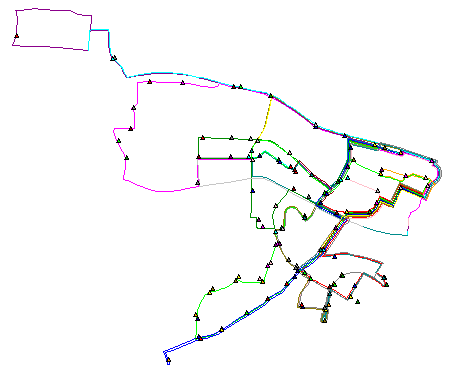
g.region vect=busroutesall -p n=n+100 s=s-100 res=500 -a
d.mon x0
d.vect -c busroutesall
# bus stops for all lines
d.vect -c busstopsall icon=basic/triangle
# look at the attributes
v.db.select busstopsall
# work on copy
g.copy vect=busroute1,route1
g.copy vect=busstopsall,stopsall
# verify map-database connections for SQLite connection
v.db.connect -p route1
v.db.connect -p stopsall
# check the selection and extract stops to a new map
v.db.select stopsall \
where=”ROUTES LIKE ‘%1%’ AND ROUTES NOT LIKE ‘%11%'”
v.extract stopsall out=stops1 \
where=”ROUTES LIKE ‘%1%’ AND ROUTES NOT LIKE ‘%11%'”
v.build.polylines route1 out=route1tmp
# substitute old ‘route1’ with new map (but we lose the table)
v.category route1tmp out=route1 op=add –o
g.remove vect=route1tmp
# add table with column to link the route with the bus stop
v.db.addtable route1 col=”lid integer”
v.db.update route1 col=lid val=1
v.db.select route1
cat|lid
1|1
v.db.addcol stops1 col=”lid integer”
v.db.update stops1 col=lid val=1
v.db.select stops1
cat|ROUTES|UPDATED|STREET_1|STREET_2|CAMPUS|…
7|1,5,7a,8,9,A,B|2006/11/14|Dan Allen Dr.||North|…
[…]
# define the order, offsets of the bus stops, preparing table
v.db.addcol stops1 col=”start_mp double precision, \
start_off double precision, end_mp double precision,\
end_off double precision”
# check direction of the vector line for the bus stops order
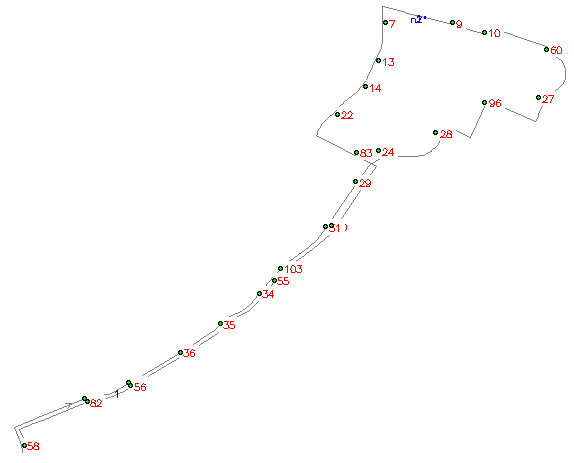
g.region vect=route1 n=n+100 s=s-100 -p
d.erase
d.vect route1 disp=shape,dir,topo col=grey lcol=blue
d.vect stops1 disp=attr attr=cat size=10 bgcolor=white
d.vect stops1 icon=basic/circle fcol=green
# update the attribute column start_mp to indicate order of the bus stops along the bus tour:
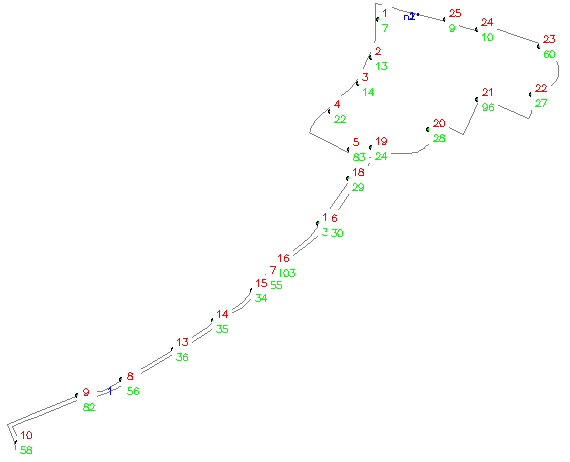
# from node n1 to n2 – line cat 1
v.db.update stops1 col=start_mp where=”cat=7″ val=1
v.db.update stops1 col=start_mp where=”cat=13″ val=2
v.db.update stops1 col=start_mp where=”cat=14″ val=3
v.db.update stops1 col=start_mp where=”cat=22″ val=4
v.db.update stops1 col=start_mp where=”cat=83″ val=5
v.db.update stops1 col=start_mp where=”cat=30″ val=6
v.db.update stops1 col=start_mp where=”cat=55″ val=7
v.db.update stops1 col=start_mp where=”cat=56″ val=8
v.db.update stops1 col=start_mp where=”cat=82″ val=9
v.db.update stops1 col=start_mp where=”cat=58″ val=10
v.db.update stops1 col=start_mp where=”cat=38″ val=11
v.db.update stops1 col=start_mp where=”cat=37″ val=12
v.db.update stops1 col=start_mp where=”cat=36″ val=13
v.db.update stops1 col=start_mp where=”cat=35″ val=14
v.db.update stops1 col=start_mp where=”cat=34″ val=15
v.db.update stops1 col=start_mp where=”cat=103″ val=16
v.db.update stops1 col=start_mp where=”cat=31″ val=17
v.db.update stops1 col=start_mp where=”cat=29″ val=18
v.db.update stops1 col=start_mp where=”cat=24″ val=19
v.db.update stops1 col=start_mp where=”cat=28″ val=20
v.db.update stops1 col=start_mp where=”cat=96″ val=21
v.db.update stops1 col=start_mp where=”cat=27″ val=22
v.db.update stops1 col=start_mp where=”cat=60″ val=23
v.db.update stops1 col=start_mp where=”cat=10″ val=24
v.db.update stops1 col=start_mp where=”cat=9″ val=25
# verify route
v.db.select route1
cat|lid
1|1
# verify stops
v.db.select stops1 \
col=cat,ROUTES,start_mp,start_off,end_mp,end_off,lid
cat|ROUTES|start_mp|start_off|end_mp|end_off|lid
7|1,5,7a,8,9,A,B|1||||1
9|1,4,5,7a,9,A,B|25||||1
…
96|1,5,7,7a,8,8a,9,A,B|21||||1
103|1,A|16||||1
# shift bus stop cat 30 onto the related vector segment
v.edit stops1 tool=move cats=30 move=18,-12
# redraw to verify updated map
d.redraw
# find maximum distance between bus stops and route1
v.distance from=stops1 to=route1 upload=dist column=dummy -p
# the highest reported value is 44.819408m
# the “start_mp” column is used to indicate the bus stops order
v.lrs.create in_lines=route1 points=stops1 out=route1_lrs \
err=lrs_error lidcol=lid pidcol=lid rstable=route1_lrs thre=45
# the error map should be empty
# verify new LRS table
db.select route1_lrs
# display complete linear reference system
d.erase
# show route and nodes
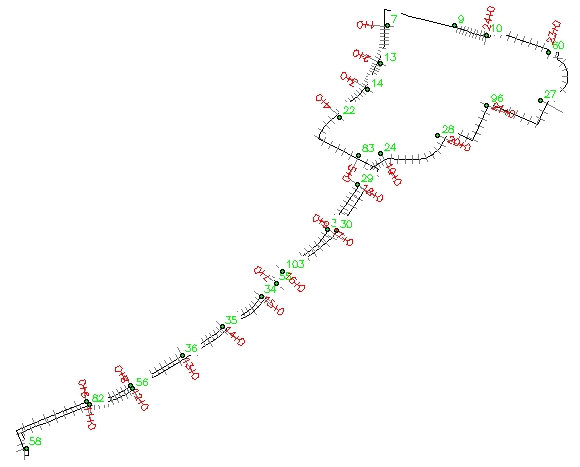
d.vect route1 disp=shape,topo col=grey lcol=blue
d.vect stops1 icon=basic/circle fcol=green
# show bus stop numbers (bottom right labels)
d.vect stops1 disp=attr attr=cat size=10 bgcolor=white \
lcol=green yref=top
# show milepost numbers (top right labels)
d.vect stops1 disp=attr attr=start_mp size=10 bgcolor=white \
lcol=red yref=bottom
Querying the LRS
# these coordinates can be retrieved via GPS
echo “638632|224857” | v.in.ascii out=position
g.region vect=route1 n=n+100 s=s-100 -p
d.erase
# show route and nodes
d.vect route1 disp=shape,topo col=grey lcol=blue
# show bus stop numbers (bottom right labels)
d.vect stops1 disp=attr attr=cat size=10 bgcolor=white \
lcol=green yref=top
# show milepost numbers (top right labels)
d.vect stops1 disp=attr attr=start_mp size=10 bgcolor=white \
lcol=blue yref=bottom
# show markers
d.vect stops1 icon=basic/circle fcol=green
d.vect position col=red icon=basic/marker size=20
v.lrs.where line=route1_lrs point=position rstab=route1_lrs
pcat|lid|mpost|offset
1|1|6.000000+134.532728
[1] points read from input
[1] positions found
# check to which bus stop the milepost 6 belongs to
# a) get corresponding bus stop number “upstream”
v.db.select stops1 col=cat,start_mp where=”start_mp=6″
cat|start_mp
30|6
# b) get next bus stop number along the tour
v.db.select stops1 col=cat,start_mp where=”start_mp=7″
cat|start_mp
55|7
# the LRS table contains even more information:
db.select sql=”SELECT * FROM route1_lrs WHERE start_mp=6″
rsid|lcat|lid|start_map|end_map|start_mp|start_off|\
end_mp|end_off|end_type
6|1|1|1946.147074|2411.275995|6|0|7|0|2
# what is the distance between bus stop 30 and 55
db.select sql=”SELECT (end_map – start_map) as dist_30_55 \
FROM route1_lrs WHERE start_mp=6″
dist_30_55
465.128921
# distance from our position to bus stop 55 (MP 7)
db.select sql=”SELECT (end_map – start_map – 134.5) as \
dist_to_55 FROM route1_lrs WHERE start_mp=6″
dist_to_55
330.628921
Visualization of the LRS
v.lrs.label route1_lrs rstable=route1_lrs labels=labels \
col=red size=50 xoffset=100 output=route1_lrs_labels
g.region vect=route1 n=n+100 s=s-100 -p
d.erase
d.vect route1_lrs
d.vect route1_lrs_labels col=grey type=line
d.vect stops1 disp=attr attr=cat size=10 bg=white lcol=green \
yref=bottom
d.vect stops1 icon=basic/circle fcol=green
d.labels labels
# simple PNG output
d.out.file route1_lrs format=png res=2
display route1_lrs.png